- Web
- Mar 30, 2026
Apple releases iOS 26 beta with Liquid Glass interface, major app upgrades
-

- Web Desk
- Jul 26, 2025
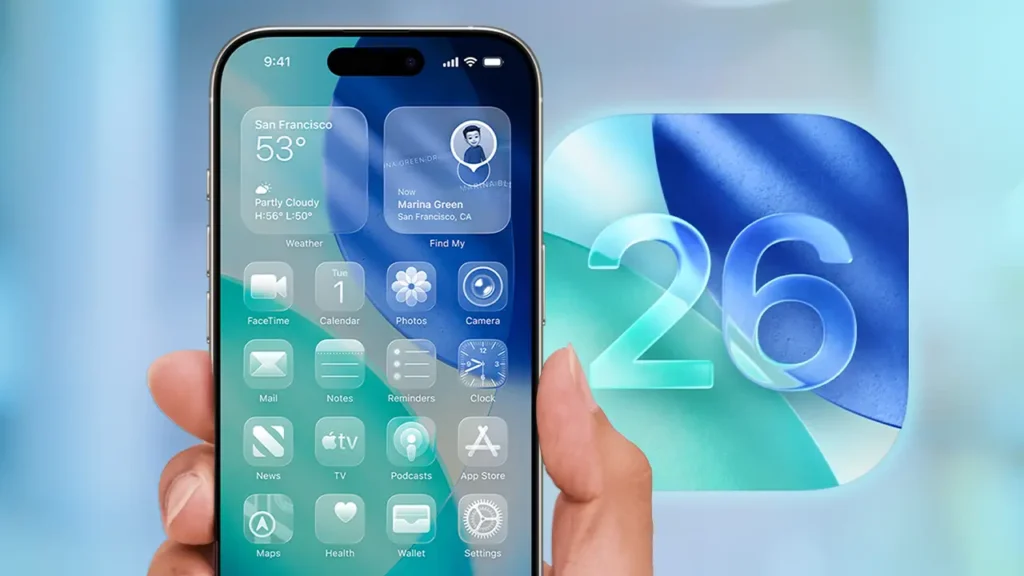
Apple has officially rolled out the public beta of iOS 26, the next major iPhone software update, packed with a sweeping redesign, powerful AI features, and overhauls to core apps. While the jump from iOS 18 to iOS 26 might puzzle some, Apple says the new naming scheme brings all its platforms in sync with the calendar year, meaning iOS 26 is built for 2026.
Here’s a rundown of the most significant changes, upgrades, and new features that make iOS 26 Apple’s most interesting update in years.
Liquid Glass interface
iOS 26 introduces the most dramatic visual revamp since iOS 13. The new “Liquid Glass” design touches every corner of the iPhone’s interface. Icons, menus, buttons, and animations have all been reimagined with a fluid, glass-like aesthetic that adapts depending on the content or context.
Apple’s Alan Dye, who heads Human Interface Design, calls this “our broadest software design update ever.” The Liquid Glass style aims to make everyday interactions more engaging and visually dynamic without disrupting the familiar feel of iOS.
Animations feel smoother, responding to your touch with fluid movement. Whether you’re opening apps or scrolling through messages, the entire experience feels more alive.
Phone app gets smarter and more useful
The Phone app has been completely redesigned. A new unified layout merges Favorites, Recents, and Voicemail into one streamlined interface. If you prefer the old look, you can switch back in settings.
But the bigger story is the new features. Call Screening answers unknown numbers on your behalf, asking callers for their name and purpose. Based on their response, you can decide whether to take the call. Another addition, Hold Assist, detects when a real person returns to the line after you’ve been put on hold—so you no longer need to sit through endless music.
Other Phone updates include a better filter for unknown callers, real-time voicemail summaries powered by Apple Intelligence, and support for SharePlay during calls.
Messages app evolves with ai and customisation
Messages, one of the most-used iPhone apps, is seeing meaningful changes. You can now set custom chat backgrounds using photos, presets, or even generate them with Apple’s AI-powered Image Playground. You can also create polls in group chats, with AI helping to suggest options automatically.
Typing indicators finally arrive in group messages, and a cleaner new layout for chat details makes it easier to find shared media, links, or files. Spam and unknown senders are easier to manage with a new filtering interface.
Other highlights include natural language search, better text selection in message bubbles, and support for Apple Cash in group threads.
Camera and Photos get thoughtful improvements
The Camera app now makes it simpler to snap quick photos and videos while keeping advanced features accessible via intuitive gestures. There’s even a helpful prompt when your lens needs cleaning, and if you’re wearing AirPods, you can snap a picture by pressing the stem.
Photos now splits its interface into two tabs, Library and Collections, making navigation smoother. You can also customise how your Collections view looks, and view your memories with new depth effects in spatial scenes.
Apple Music, now with AI DJ skills
Apple Music users will notice the new AutoMix feature, which uses AI to create seamless transitions between songs, much like a live DJ set. Lyrics translation and pronunciation support also mean users can enjoy and understand foreign-language songs more easily.
Apple Intelligence now more capable
iOS 26 builds on Apple Intelligence, the company’s expanding suite of on-device AI features. Visual Intelligence now lets you act on anything visible on your screen. Snap a screenshot and use it to add an event to your calendar, search online, or even ask ChatGPT for insights, all while keeping your data private.
Live Translation is another standout addition. Available in Messages, FaceTime, and the Phone app, it offers real-time translation of both audio and text. You can talk in your native language and have it instantly translated for the recipient, and vice versa.
Shortcuts in iOS 26 have also been supercharged. You can now build workflows that communicate directly with Apple’s models or ChatGPT, using inputs from your apps, messages, or notes.
Genmoji, Image Playground, and more
iOS 26 adds more creative freedom to Genmoji, letting users blend multiple emojis and tweak expressions, hair, and facial features. Image Playground also gets smarter, now supporting ChatGPT integration with more styles like Watercolour and Oil Painting.
Device compatibility and availability
If you own an iPhone 11 or newer, or the second-gen iPhone SE, you’re eligible to test iOS 26. That includes all iPhone 12, 13, 14, 15, and 16 series models.
iOS 26 is shaping up to be one of the most complete and polished iPhone updates yet. With its bold visual overhaul, smarter apps, and Apple Intelligence embedded throughout, this is Apple’s clearest move toward a more personalised and intelligent mobile experience, while still looking and feeling unmistakably iPhone.
The final version will arrive later this year, but the public beta is now available for those eager to explore what’s next.
You May Also Like


- Web
- Mar 09, 2026
Anthropic sues Pentagon over AI restrictions

- Web Desk
- Feb 16, 2026
X service restored after global disruption